 writing
Send an LLM a support ticket and four labels, and ask which label fits. It writes back {"label": "billing"}, one token at a time, each token another trip through the model. The word “billing” was in your prompt the whole time. You typed it.
Extraction is the same. The invoice number is in the PDF. You ask for it, and the model types it back to you. Usually it types it right.
A lot of what we hand to LLMs looks like this: the answer is already sitting in the input, and we’re paying a writer to copy it out. A model that just points at the right label, or at the right span of the document, fits these jobs better. That’s the idea behind ScaleDown’s Constrained Decoding Models (CDMs), which launched on October 13. The idea is a lot older than CDMs, though, and it has clear limits. This post covers both.
Writing an answer is a loop
An LLM produces text one token at a time. A token is a chunk of text, roughly ¾ of a word. The model reads your whole prompt in one parallel pass, then writes the first token, appends it, writes the next, and so on until it stops. Each new token waits for the one before it. (My earlier post on long sessions walks through why, if you want the mechanics.)
That loop is why output tokens cost more. On Anthropic’s price list, Claude Sonnet 5.5 is $2 per million input tokens and $10 per million output tokens. Haiku 4.5 is $1 and $5. Output is five times the price of input.
To be fair, a ten-token label is a tiny part of the bill. Most of the cost of a classification call is the input. The bigger problem with writing is that a writer can write anything. “Billing” with a capital B. “billing_dispute”. “Sure! The label is billing.” Or a label you never offered. So you add a parser, a retry loop, a schema check. Structured outputs and JSON mode narrow what it can write, and they’re good tools, but as one guide puts it, treat them “as a format constraint, not a correctness guarantee.” The model is still writing.
Demo 1: write it vs point at it
Press Step and watch the writer build its answer one token at a time while the pointer finishes in one go. Then press "What else could it write?" and see which answers your code could actually use.
Labels: billing, account, technical, shipping
Writer (LLM)
Pointer (scores your labels)
Sample values, not live model calls. The token split and the probabilities are hand-written to show the shape. The writer's pass count is one pass to read the prompt plus one per output token. The pointer's single pass is how ScaleDown describes its models. Its architecture isn't published.
Pointing is an old trick
None of this is new. Before chat models, a lot of NLP worked by pointing.
- Pointer Networks (Vinyals et al., 2015) used attention to pick an element of the input sequence as the output, instead of generating from a fixed vocabulary.
- SQuAD (Rajpurkar et al., 2016), the reading-comprehension benchmark, defined every answer as “a segment of text from the corresponding reading passage.”
- BERT (Devlin et al., 2018) handled SQuAD with “just one additional output layer”: for every token it scored how likely that token is to be the start of the answer and how likely it’s the end, then took the best span.
- Named entity recognition still works this way. Hugging Face’s token-classification pipeline “assigns a label to individual tokens” and returns
entity,score,startandend.
Classification is pointing at a list instead of a document. You run the text through the model once and get a score for every label. The answer can only be one of the labels, because those are the only things being scored.
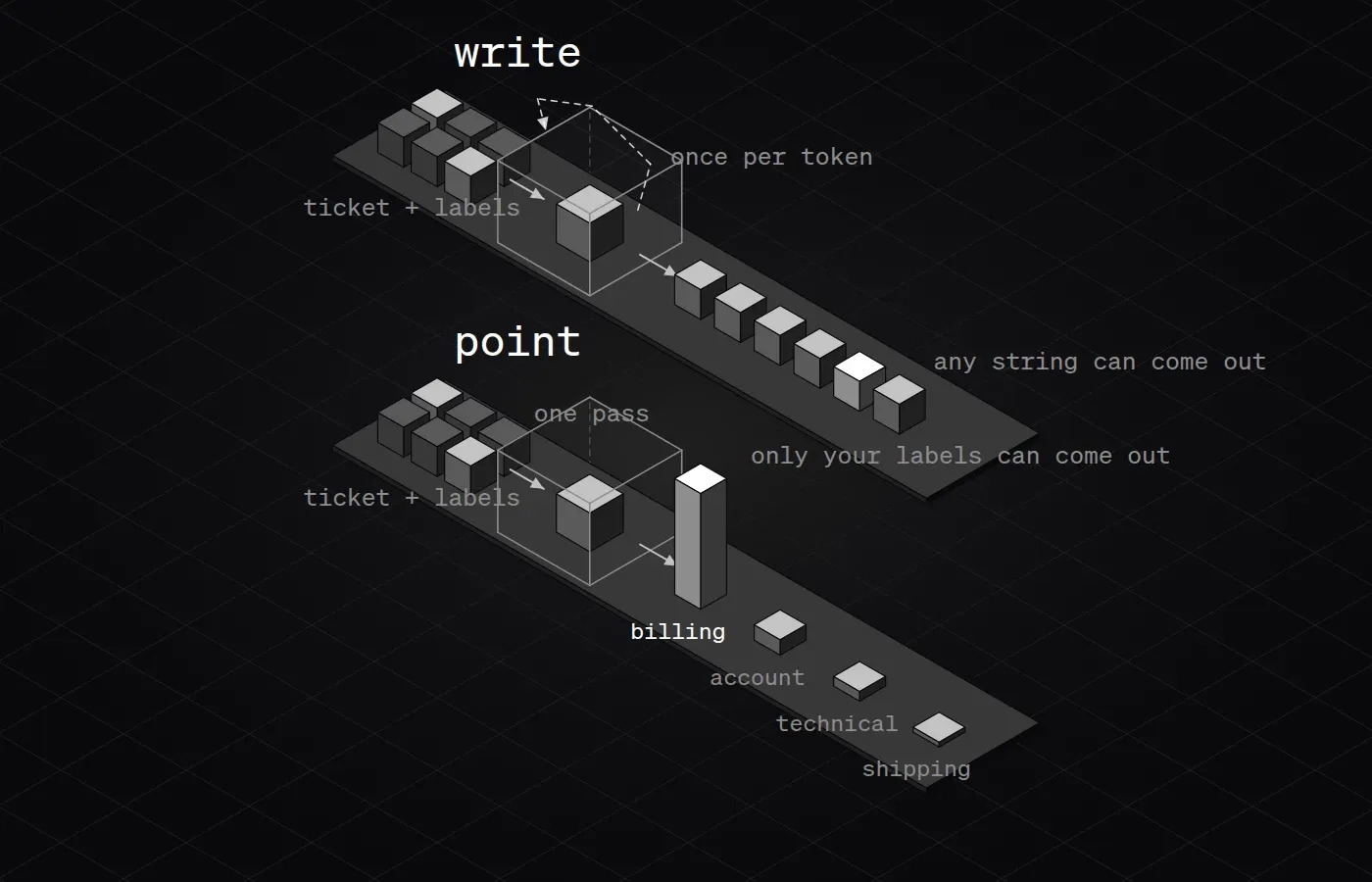
What ScaleDown’s CDMs actually are
ScaleDown, whose co-founder and CEO is Neal Patel, launched four small task models on October 13. The LangChain partner post (which Patel co-wrote) describes the idea in one line: “Where a general-purpose LLM writes any string one token at a time, a CDM is trained for one task and only returns answers that task allows, like a label from your list or spans of the input.”
A small naming note before going further. The launch tweet and the LangChain post call the whole family CDMs. ScaleDown’s own docs use “Constrained Decoding Model” for the classification model specifically. And neither matches what “constrained decoding” means in libraries like Outlines or XGrammar, where it’s a mask that stops a normal LLM from writing tokens that break your schema. Here it’s a product name.
Here’s what each model does, according to ScaleDown’s docs:
| Model | What you send | What you get | Point or write? |
|---|---|---|---|
| Classify | Text, plus labels with a one-line rubric each | top_label, a scores map that sums to 1.0, an optional one-sentence reasoning | Points at your label list |
| Extract | Text, plus the fields you want | entities, each with the exact text, a confidence, and start/end offsets | Points at spans of your document |
| Summarize | Long text | A summary, up to 1,000 tokens | Writes. The docs: “the output is a fluent rewrite - not a selection of lifted sentences.” |
| Compress | Long context, like tool output or chat history | A shorter version for your main LLM | Not documented either way |
So the title holds for two of the four. Classify “scores the text against the label’s rubric” for each label. Extract returns “the exact text span extracted from the input,” with its position, and its confidence is “the probability the model assigned to this exact text.” Those are pointers. Summarize is a writer, and ScaleDown says so plainly.
A Classify response looks like this (field names from the docs, values made up):
{
  "top_label": "billing",
  "scores": { "billing": 0.91, "account": 0.05, "technical": 0.03, "shipping": 0.01 },
  "reasoning": "The customer reports a duplicate charge that was not refunded."
}
One detail in the docs is worth knowing: the reasoning sentence is generated after the label is picked, with the label passed in. It explains the decision. It doesn’t make it.
Demo 2: point at the span, or retype it
Click a field to see the span it points to. Switch to "Write it", press "Simulate a copy slip", and check whether you could catch the mistake. Then try "item count".
Made-up invoice, sample confidences. The offsets are computed live from the text above, so they are real for this string. The copy slip is a typical transposition, not a measured error rate for any model.
The useful part of pointing isn’t speed. It’s that the answer comes with its own receipt. If Extract says the invoice number is at characters 8 to 17, you can slice your own string and check. A written answer gives you a value and nothing to check it against.
Where they’d sit in an app
CDMs aren’t a replacement for your main model. The LangChain post says to keep a general LLM for open-ended work. The intended setup puts small models around the big one, doing the routine jobs:
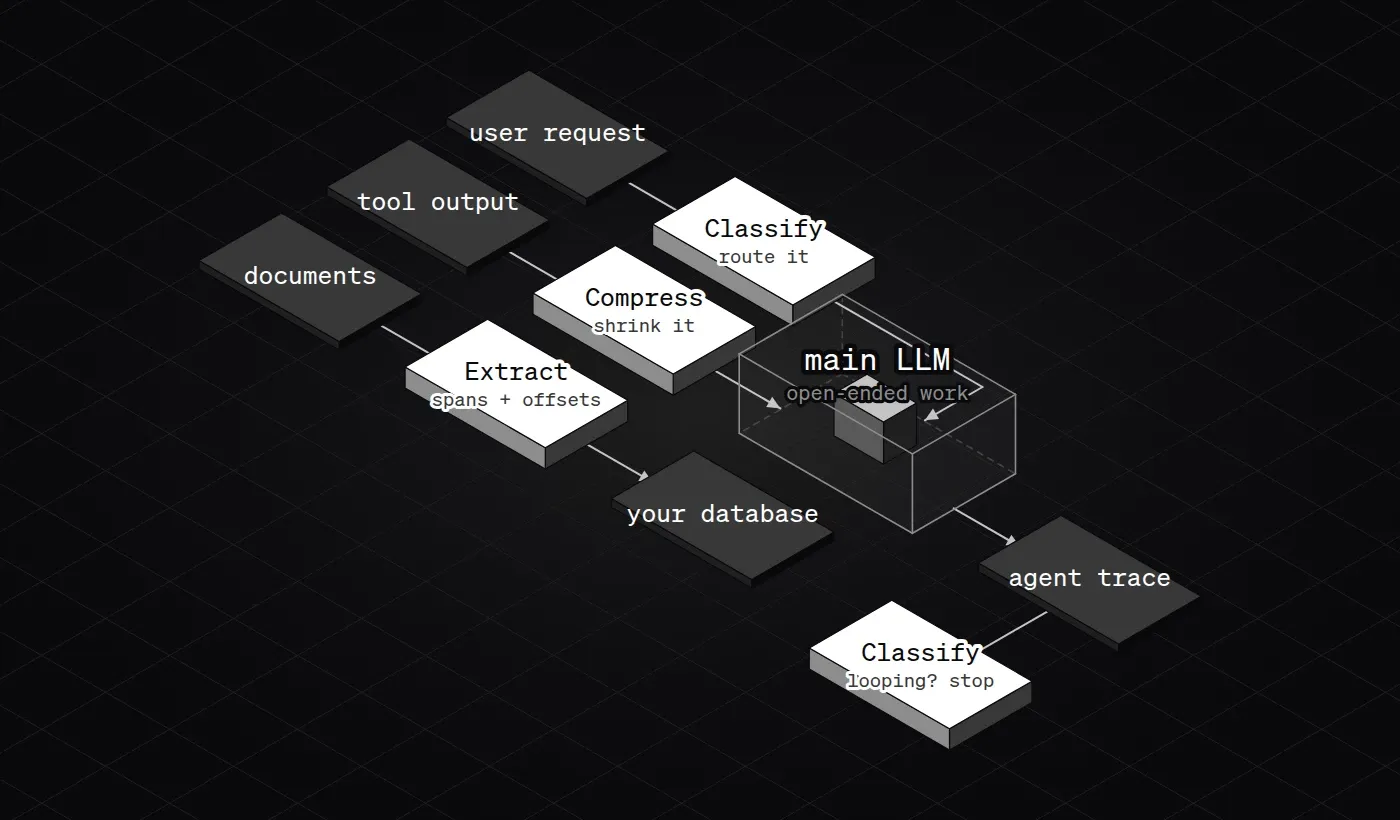
LangChain ships these as middleware in langchain-scaledown, and the middleware fails open: if the ScaleDown call fails, the agent carries on without it. That’s the right default for a helper.
A score is only useful if you know what it means
Pointers give you numbers, and numbers invite thresholds. LangChain’s loop check stops a run when “looping” scores above 0.8. That only works if 0.8 means something like “right 80% of the time.” A model can be confidently wrong, and two things in the Classify docs make that worth watching.
First, the scores in single-label mode always sum to 1.0, and “the endpoint always returns a winner - even if the model is uncertain.” If none of your labels fit, one of them still wins. The docs suggest adding a catch-all label like other for that. Second, ScaleDown doesn’t publish calibration data, the measure of whether stated confidence matches how often the model is right. Jev got the same question on Hacker News last month, and the honest answer for both is: measure it on your own labeled data.
Demo 3: pick a threshold
Drag the threshold and watch how many answers you'd accept automatically and how many wrong ones slip through. Then switch to the overconfident model and keep the same threshold.
Synthetic data, not ScaleDown's. 1,000 fake predictions generated in your browser. "Well calibrated" means a 0.8 score is right about 80% of the time. "Overconfident" means scores run higher than the real hit rate. Real models land somewhere in between, and only your own labeled sample tells you where.
Jev, OpenAI and Cloudflare do half of this
CDMs aren’t alone. A month earlier, TypeSafe AI launched Jev (I wrote about it here), and since then OpenAI’s Decisions API and Cloudflare’s Clef models have shown up with the same shape: you send text and typed questions (yes/no, pick one, score) and get probabilities back, with no text written. That’s Classify. What none of them document is pointing at spans or shortening long text.
| Pick a label | Point at spans | Summarize / compress | Input price per 1M tokens | |
|---|---|---|---|---|
| ScaleDown CDMs | Yes, with an optional reason | Yes, with offsets | Yes | $0.05, output free |
| TypeSafe Jev | Yes | No | No | $0.042, output free |
| OpenAI Decisions | Yes | No | No | $0.10 (secondary source, beta) |
| Cloudflare Clef / Clef-flash | Yes | No | No | $0.24 / $0.038 |
All of these prices are list prices from the vendors (OpenAI’s from a secondary write-up), checked October 15, 2026, and they’re moving fast. The CDM price comes from LiteLLM’s provider page: “$0.05 per million input tokens, with no charge for output.”
Demo 4: what a label costs at your volume
Set your daily volume and request size, then raise the output tokens to see when the writer's output starts to matter.
List prices, not a benchmark. Defaults are Claude Haiku 4.5's list price ($1 / $5) and ScaleDown's $0.05 input with free output. It assumes both models see the same token count, which they won't exactly, since tokenizers differ. Price says nothing about accuracy on your data.
With the defaults the output share is about 9%. That’s the honest version of the cost story: for a short label, the saving comes from the cheaper input price, not from skipping the writing. Writing gets expensive when the answer is long, like an extraction with twenty fields.
What pointing can’t do
- The answer has to be in the input. “How many items are on this invoice?” needs adding up. “Convert ‘next Friday’ to a date” needs a calendar. A pointer has nothing to point at. That’s a job for a writer.
- It can point at the wrong thing. A valid label is not a correct one. Classify always picks a winner, even when nothing fits.
- Half the family writes. Summarize is abstractive by ScaleDown’s own docs. Compress doesn’t say how it works. Don’t assume the “can’t make things up” property applies to them.
- The numbers are ScaleDown’s. The tweet says 200x faster and 467x cheaper, and 77.2% on a “DecisionBench” I couldn’t find anywhere public. ScaleDown’s own benchmark docs are far more modest: 8 to 19.5% more accurate and 2.2x to 13.9x faster than models from OpenAI, Anthropic, Google, xAI, DeepSeek and Qwen, on CLINC OOS, CUAD, QMSum and FinanceBench. Nobody independent has reproduced either set yet.
- Some claims come only from the launch. “One pass” and the 1M-token context appear in the tweet and the partner post, not the API docs. The architecture isn’t published.
- The docs have rough edges. The Extract page calls offsets character positions in one place and byte positions in another. With non-English text those are different numbers, so check before you slice.
- Your text leaves your servers. It’s a hosted API. Through LiteLLM you also lose a few knobs: no strict schemas, no temperature, no function calling.
Sources
- Neal Patel, ScaleDown launch post on X: x.com/neal_k_patel
- LangChain, Building long-running agents with ScaleDown and Deep Agents: langchain.com/blog
- LangChain docs, ScaleDown middleware: docs.langchain.com
- ScaleDown docs, Classify: docs.scaledown.ai/api-reference/classify
- ScaleDown docs, Extract: docs.scaledown.ai/api-reference/extract
- ScaleDown docs, Summarize: docs.scaledown.ai/api-reference/summarize
- ScaleDown docs, Compress: docs.scaledown.ai/api-reference/compress
- ScaleDown docs, benchmarks overview and methodology: docs.scaledown.ai/benchmarks/overview, methodology
- LiteLLM, ScaleDown provider: docs.litellm.ai/docs/providers/scaledown
- Vinyals, Fortunato and Jaitly, Pointer Networks (2015): arxiv.org/abs/1506.03134
- Rajpurkar et al., SQuAD (2016): arxiv.org/abs/1606.05250
- Devlin et al., BERT (2018): arxiv.org/abs/1810.04805
- Hugging Face, token classification: huggingface.co/docs/transformers/tasks/token_classification
- Anthropic, pricing: platform.claude.com/docs/en/about-claude/pricing
- TypeSafe AI, Introducing System One Models & Jev: typesafe.ai/blog
- Vercel AI Gateway, OpenAI Decisions: vercel.com/docs
- Cloudflare, Clef decision models: blog.cloudflare.com/clef-decision-models
- Structured outputs in production (the “format constraint” guide): tianpan.co
All demo values are sample or synthetic data computed in your browser, labeled in each demo. Prices are vendor list prices as of October 15, 2026.